

PhotoGenerAI
Sorry I Lied / Perdón

Sorry I Lied Trend Photo Maker

Start with the real photo. Make it a little too perfect, one detail at a time. Download your favorites and let the reveal speak for itself.

Start with free credits. No account required.

Try a real-life pet photo

Photo shape, model & credit cost
Optional
Photo shape
Your latest photo

The reveal

One photo. A few little lies.

Fluffy terrier in a pink outfit on a velvet sofa in a luxury living room
The dream
The same groomed terrier in its pink outfit on an ordinary worn sofa
I lied about the room
The same fluffy terrier on the worn sofa without its pink capelet or bow
And the outfit
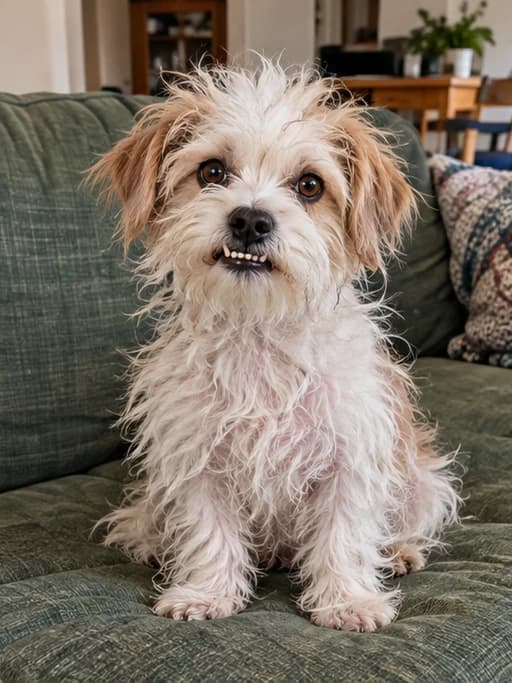
The same terrier with scruffy uneven fur and a goofy expression on the worn sofa
Okay… I'm sorry

Make the photos here. Share the reveal your way.

Your photo collection 0

Your photos stay together here. Open them, pick your favorites and download.
Your first photo goes here
Generate a photo above. Each new result joins this collection, ready to download.

The Sorry I Lied trend, one swipe at a time

It gets a little more honest with every photo.

The fancy room goes first. Then the outfit. Finally, the everyday dog makes an appearance. For your Sorry I Lied trend, make the changes from real to ideal, then share your favorite photos in the opposite order.

Fluffy terrier in a pink outfit on a velvet sofa in a luxury living room01

The dream

A little too perfect

The same groomed terrier in its pink outfit on an ordinary worn sofa02

I lied about the room

Back to the old sofa

The same fluffy terrier on the worn sofa without its pink capelet or bow03

And the outfit

No cape. No bow.

The same terrier with scruffy uneven fur and a goofy expression on the worn sofa04

Okay… I'm sorry

The everyday version

How to make the Sorry I Lied trend photos

01

Start with the real photo

Upload the everyday picture you want to reveal at the end of your Sorry I Lied trend. Choose Pet, Me, Partner, My room or Costume. You can start with the pet example if you want to try the tool first. A clear subject and a simple composition make the changes easier to follow.


02

Make one change, then another

Choose a suggestion or write your own instruction. Generate a photo, check it, then use Continue editing to bring the result into your next edit. Say exactly which image to work from and which detail to change. The collection below keeps your generated photos together while you try different versions of the trend.

03

Download your favorites and take them with you

Open any photo in the collection to view it larger, or download it directly. Keep the variations that tell the clearest Sorry I Lied story. Add them to a TikTok photo carousel or the template you want to use, placing the most ideal version first and your original photo last.

I'm sorry I lied. Perdón.

What is the Sorry I Lied trend?

The Sorry I Lied trend turns the gap between a perfect AI photo and an ordinary real photo into a joke. It starts with the version you wish were true. Each following photo takes back one part of that story, until the original supplies the punchline.

You may know it as the "I'm sorry I lied trend," "I'm so sorry I lied," or the Spanish "Perdón" trend. A photo carousel is enough. The surprise comes from the pictures and the order you choose, rather than a complicated video edit.

The photo trend has appeared in sport, pet and partner posts as well as Halloween costumes. See the hockey example from @miamrquz and the multi-photo dog reveal from @ssecrettttt_20. They show how the same trend can work with very different subjects.

Make each change easy to spot

For a clear Sorry I Lied trend, change something the viewer can name: the coat is fluffier, the outfit is fancier, or the room looks expensive. Keep the pose and framing consistent. If every photo changes the face, background and clothes together, the reveal is harder to follow.

Try one edit, inspect the result and then decide what to add next. A result you do not use can still stay in your collection while you try another. You choose which pictures make the final Sorry I Lied post; the tool does not lock you into an order.

Take your photos to TikTok

Download the best versions and keep your original ready. Arrange them from the biggest upgrade to the real photo. Add your own short confessions, select the sound from a Sorry I Lied or Perdón post, and use a carousel or your preferred template. PhotoGenerAI handles the photo edits so you can finish the post wherever you like.

For the next Sorry I Lied trend photo, keep your description specific. "Change only the outfit" gives a more focused instruction than "make everything perfect." If you need a general edit first, the AI photo editor can help you start from the picture you have.

Pick a subject. Keep the joke yours.

Sorry I Lied trend ideas beyond a perfect selfie

Pet

Sorry I Lied dog and cat photos

The Sorry I Lied trend works especially well with a pet whose everyday photo already has personality. A scruffy coat, an awkward expression or a tired sofa gives the final reveal something funny to return to. Start with one grooming change, then try an outfit or a different setting. Keep the same ears, markings and pose so your pet stays recognizable throughout the trend.

Try: Fluffier fur · Fancy outfit · Dream setting

Make your photos
Me

Make the Sorry I Lied trend with your own photo

An ordinary selfie, a sports photo or an awkward portrait can start your Sorry I Lied trend. Choose a change that can be seen at a glance: a polished hairstyle, a new outfit or a much more impressive location. Generate those changes separately. When you share the photos in reverse, each swipe reveals another detail that was too good to be true.

Try: Salon hair · Better outfit · Dream location

Make your photos
Partner

A partner photo with an exaggerated upgrade

For a partner version of the Sorry I Lied trend, the contrast can come from styling and surroundings. Try a smarter outfit, then a fine-dining setting. You do not need a completely different face for the trend to work. Keep the person recognizable and let the ordinary original photograph supply the last reversal. Each generated variation remains available below the tool.

Try: Fresh hairstyle · Dress up · Fancy restaurant

Make your photos
My room

Turn your room into a Sorry I Lied reveal

A room gives the Sorry I Lied trend a different kind of punchline. The final photo might show the familiar clutter or mismatched furniture that the earlier photos hid. Improve the lighting, replace one furniture item or add a few decorations in separate edits. Preserve the windows, walls and camera position so the trend still reads as the same room.

Try: Better lighting · Upgrade furniture · Add decor

Make your photos
Costume

The I'm Sorry I Lied costume trend

The Halloween costume version is one way to join the Sorry I Lied trend. Start with the costume photo you actually have, then improve one part of it: the fabric, an accessory or the backdrop. Keep the same costume idea and main colors. The trend is broader than Halloween, so pets, everyday outfits and rooms belong on the same page too.

Try: Luxury fabric · Add accessories · Halloween setting

Make your photos

Already have another idea?

Write your own instruction in the generator. The Sorry I Lied trend does not require a fixed set of upgrades. A familiar subject, a believable first image and a funny real ending are enough to build your version of the trend.

For an outfit-focused reveal, try the AI clothes changer. For a different kind of image joke, explore the meme editor.

Sorry I Lied trend questions

Scruffy terrier before a playful makeoverBefore
The same terrier with groomed fur and a pink outfitAfter

More photo ideas

Your next photo can tell another story

Have a different photo idea? Open our AI photo generator to edit a background, try a new style or make an image from words.

PhotoGenerAI

Your Sorry I Lied trend starts with the real photo.

Try an upgrade, keep the photos you like and take them with you.

Make my photos